
Showing posts with label Basic. Show all posts
Showing posts with label Basic. Show all posts
Friday, January 18, 2013

Wednesday, February 29, 2012

Saturday, October 29, 2011
Free Streaming Tutorials by 3d-Place
3d-Place open new section of their web site - Free Streaming Tutorials, where they plan to released new video tutorials on each Monday and Friday.
Friday, September 16, 2011
Self Referencing Script Controllers
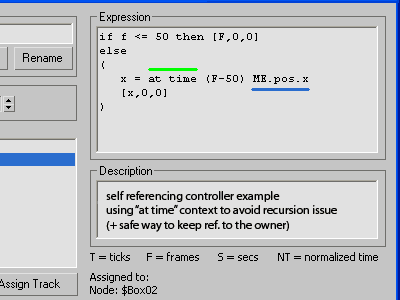
It's a known problem, I think. The recursion issue appear if we call itself from within Script Controller. The main subject of this thread is how to simplify the "bypass" that usually we made with Custom Attributies. So, I think its s'd be interesting subject for animators and mostly riggers, for scripters maybe too. Usually I suggest workaround that I call "proxy controller", as it's easy for understanding and following, but this time I decide to share and another approach that not so abstract as it looks. It's based on "at time" context which made self-call safety. Well, I'll not going to repeat myself, so just read the forum topic. Cheers!
Tuesday, September 13, 2011
Undo SubObject Level
This is a macro script requested in the ScriptSpot forum. First to say, Kostadin Kotev already filled that request with his SubObjectModeToggle script.
My quick version (Undo SubObject Level) is a bit more simple, and probably not match strictly David request, but I beliеve it's more than simple and allows everybody to grasp the idea behind and calibrate the code to his personal needs.
The nut here is the Swap function I used to do 2 operations at once - store current SubObject Level (SOL) to a variable and restore the previous SOL state stored in those the same variable.
Well, too much words for so simple tool, right? I'm sure that after trying it you'll find out for a no time what it do and how it works ;) To test the script after running it once, open your Customize dialog and assign a keyboard shortcut, i.e. follow usual macro script installation procedure. And have fun ;)
My quick version (Undo SubObject Level) is a bit more simple, and probably not match strictly David request, but I beliеve it's more than simple and allows everybody to grasp the idea behind and calibrate the code to his personal needs.
The nut here is the Swap function I used to do 2 operations at once - store current SubObject Level (SOL) to a variable and restore the previous SOL state stored in those the same variable.
Well, too much words for so simple tool, right? I'm sure that after trying it you'll find out for a no time what it do and how it works ;) To test the script after running it once, open your Customize dialog and assign a keyboard shortcut, i.e. follow usual macro script installation procedure. And have fun ;)
Thursday, August 18, 2011
Basic tip on FindItem in Array
Working with MaxScript's Arrays is so easy, compared with arrays in programming languages of cuz, but some ops still need to write our own custom functions. Well, I done some quick help on user question about FindItem, and here is the forum topic if you interested though.
Thursday, August 11, 2011
Lumberman
I'm a bit busy right now and this is very quick help on user request, but its better than nothing, I hope. It's about to track and delete a wood of thousands overlaped tree proxies, from where come and this funny name Lumberman :) Those script is plain and dirty solution that fill partially this task, but there is some known limitations about proxies, - they have not actual geometry on the scene, and... well, instead of repeat my words, just check the script page for details.
Sunday, July 10, 2011
Grab Children script
It's a bean script (requested at ScriptSpot) that I done quickly, that select all children on picked object(s). More details here.
Tuesday, May 24, 2011
Scene Bracket

Scene Bracket is a script by Pete Addington (LoneRobot) that allows quickly to (re)store the current time frame you are working in.
Wednesday, May 11, 2011
Why Real-World Scale?

TurboSquid posted new video tutorial on their YouTube channel.
Why should you make your model to real-world scale? One good reason is dynamics simulation, which relies on real-world scale to do its job right.
Tuesday, April 19, 2011
UVW Unwrap Tutorial for hard-edged Objects

Step-by-step UVW Unwrapping tutorial by Tudor Nita, that cover overlapped and flipped UVs and some basic UV stitching techniques.
Thursday, March 17, 2011
3DSpeedy - tips & tricks

3DSpeedy is a new resource of bite size tips & tricks for 3D users spanning all programs. The blog started by Erik Jensen (Max) and Nick Hopkins (Cinema 4D). They encourage users of all programs to contribute to their community.
Tuesday, January 25, 2011
Coding a Blueprint Manager

Anton Vasilescu post three-part series video tutorial on how to create a "Blueprint Manager" script.
Sunday, January 9, 2011

Tuesday, December 28, 2010
FBX batch exporter
The question (read here) is (quote): I need a script that will batch export a selection of objects in a scene as .FBX files named the same as they are in max and into the same folder as the max file.
...and here is my quick reply:
Cheers
...and here is my quick reply:
...hope its useful. If you need to specifying FBX export settings, look into the MAXScript Reference for "FBX Export Dialog Access" topic.if maxFilePath != "" and selection.count > 0 do
(
savePath = maxFilePath
selObjs = getCurrentSelection()
clearSelection()
for obj in selObjs do
(
select obj
FName = savePath + obj.name + ".fbx"
exportFile FName #noPrompt selectedOnly:true
)
)
Cheers
Thursday, December 23, 2010

Monday, December 20, 2010
Batch namespacing
How to batch process (with script) by name (scene object, modifiers, materials, ...), seems that question appear frequently. Here is a few recent forum topics that can helps about --
Wednesday, December 15, 2010
Customizing 3ds Max Start Up Settings
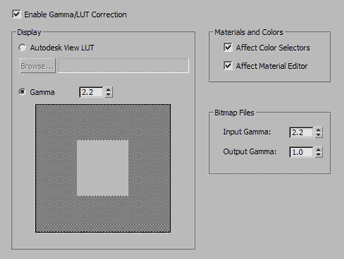
Using a maxstart.max scene is old and well known tip. Fred Ruff just append a few tips to it bound up with VRay setup.
Thursday, December 9, 2010

Subscribe to:
Posts (Atom)

 Posts
Posts


