Showing posts with label Materials. Show all posts
Showing posts with label Materials. Show all posts
Monday, November 19, 2012
Select Edges By Material ID
Ok, here is a new MaxScript from me. It's just my quick attempt to help on user request in ScriptSpot forum. Enjoy!

Thursday, November 15, 2012
Delete Duplicate Matte Render Elements
Well, incidentally, heh.. :) this script was only snippet code that I post into ScriptSpot forum as quick help reply, but I wrap it in a macro script and uplaod a copy on my web site.
The script is made for concrete purpose, so be sure you read the forum thread before run or use that macros.
Also just to note that the snippet code I post into the forum is not safe as the script should process only matte render elements, so it's better to use the macros that I uploaded on my web site.
That's it for now ;)
The script is made for concrete purpose, so be sure you read the forum thread before run or use that macros.
Also just to note that the snippet code I post into the forum is not safe as the script should process only matte render elements, so it's better to use the macros that I uploaded on my web site.
That's it for now ;)
Wednesday, January 18, 2012

Thursday, January 12, 2012
LED style animation with MAXScript
Just illustration of an example approach which can be done and without writing code but there also a few points where using MAXScript (3ds Max scripting) can save alot of time.
Ok, I don't want to repeat my self by rewriting all description, more details at ScriptSpot. Also just to note that this quick tutorial just illustrate the idea of using "brush" but its prepared just for circular brush printing.
Saturday, December 3, 2011
Friday, September 30, 2011
Select By Material ID
As the title of the script telling all, no need extra notes, right? I wrote this script by user request at ScriptSpot forum. More details and the script you can find there.
But... OK, here is a few notes anyway.
It's a macro script that select all faces with Mareial ID equal to selected one. Work with base objects converted to Editable Poly or Mesh, plus with 4 modifiers (Edit Mesh, Mesh Select, Edit Poly, Poly Select). Work on currently selected object/modifier in the modifier stack (which make it usage very flexible).
Well, need some warning notes about Edit Poly Modifier.
Yeah, a very powerful modifier but with unstable scripting control.
The rest 3 modifiers involved here works fine and stable, but you can end with incorrect result when using Edit Poly modifier, and this not come from the script code but from the unstable nature of EditPolyMod interface. Sorry to tell that but this cannot be fixed with scripting code.
Possible "Plan B" could be to add new modifier on top (as Poly Select for instance), but this is very dirty solution. As we need stable and working code in production as more sensibly would be to replace "naughty mod" with other modifiers (like Edit Mesh for instance).
This is another script which reminded me why I not trust to this modifier and why I do not use it anymore in my scripts. So you're warned, and I can't do anything more than this for you, right?
However, I hope you appreciate my efforts and all the comforts that come from this macros.
But... OK, here is a few notes anyway.
It's a macro script that select all faces with Mareial ID equal to selected one. Work with base objects converted to Editable Poly or Mesh, plus with 4 modifiers (Edit Mesh, Mesh Select, Edit Poly, Poly Select). Work on currently selected object/modifier in the modifier stack (which make it usage very flexible).
Well, need some warning notes about Edit Poly Modifier.
Yeah, a very powerful modifier but with unstable scripting control.
The rest 3 modifiers involved here works fine and stable, but you can end with incorrect result when using Edit Poly modifier, and this not come from the script code but from the unstable nature of EditPolyMod interface. Sorry to tell that but this cannot be fixed with scripting code.
Possible "Plan B" could be to add new modifier on top (as Poly Select for instance), but this is very dirty solution. As we need stable and working code in production as more sensibly would be to replace "naughty mod" with other modifiers (like Edit Mesh for instance).
This is another script which reminded me why I not trust to this modifier and why I do not use it anymore in my scripts. So you're warned, and I can't do anything more than this for you, right?
However, I hope you appreciate my efforts and all the comforts that come from this macros.
Sunday, September 18, 2011
Fit the UVW Mapping Gizmo
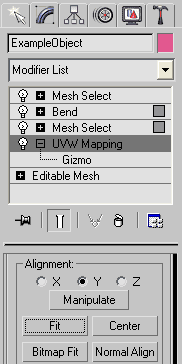 Fit the UVW Mapping Gizmo is a macro script for 3ds Max 2008 and higher, and will works in previous version with free AVG extensions installed.
 Hardly need to explain what Fit gizmo do in UVW Mapping modifier, nor yet the need and benefit of it automation via script, right?
That operation is not directly accessible to MAXScript, but thanks to Borislav "Bobo" Petrov and his nice tutorial on this task. He explain very well (as always) the matrix transforms.
Well, maybe my code hold some learning value too. However, as I not found such script online, I hope my script would be welcome to all Max'ers. (Script page)
Tuesday, August 2, 2011
Worm Face tool
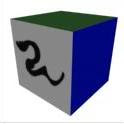
A new script (Worm Face) by Shawn Olson added to his collection package (Wall Worm Mod Tools). More details.
Sunday, July 10, 2011
RTTassist 1.5
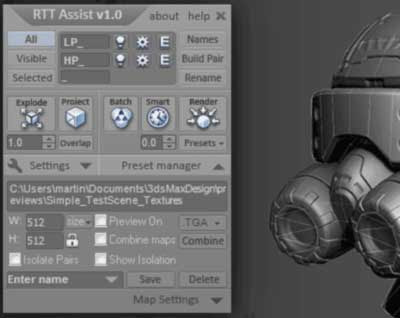
Kostadin Kotev update his RTTassist and the big news this time is that the source code is now fully available. Read more about version 1.5 here.
Tuesday, May 24, 2011
Material Instances tip

It's probably an old and known but nice tip for an issue with Instancing Materials in 3ds Max 2010, posted by Mark Green at DesignReform.net.

Thursday, May 5, 2011
Friday, April 22, 2011
Enable Two-Sided Map in Max 2011 and 2012

Nice quick tip for mentalray users by Ramy Hanna on how to make visible the Two-Sided Map that is hidden in Max 2011 and 2012.
Tuesday, April 19, 2011
UVW Unwrap Tutorial for hard-edged Objects

Step-by-step UVW Unwrapping tutorial by Tudor Nita, that cover overlapped and flipped UVs and some basic UV stitching techniques.
Friday, April 15, 2011
Glowing Material

Tutorial by Mario Malagrino (Florence Design Academy) explains how to create a glowing material using architectural and standard materials, plus how to use the Glare shader to improve glow effects.
Thursday, April 14, 2011
Remove missing maps
All we know that clean up a scene with a lot of missing maps without automation is a hell task. That feature in Max still missing and requested, this time in Autodesk UserVoice section. So what we can do for now is to solve this by scripting, and the good news is that a fresh topic about appear at CGTalk.
Wednesday, April 6, 2011
Tackling unrealistic materials

Jamie Cardoso tips. Quote: "It is worth noting that the following is a full version of an article I have recently contributed to. Please have a look at the 3D World magazine(i.e. issue 141)for more in-depth tips."
Thursday, March 10, 2011

Wednesday, March 9, 2011
RTTassist v1.1

RTTassist version 1.1 is released and now supports 3dsmax 9 plus some new features added. What's new in version 1.1 (posted at CGTalk thread):
- 3dsmax 9 is now supported.
- Automatic and manual check for updates.
- New "Projection List" dialog showing the Reference Geometry list of all Low-Poly objects in one place.
- Progress bar now show the progress of UV area calculations when using "Smart".
- "Show preview" checkbox added in the "Combine Maps" dialog.
Thursday, February 24, 2011
RTTassist 1.0

I glad to see that my friend Kostadin Kotev finally release his awesome RTTassist script. He works together on RTTassist with Martin Punchev (game artist).
Original description:
RTTassist is a free MaxScript toolset shaped in a beautiful interface that automates the tedious process of texture baking. It has a wide range of features, but most especially it is designed to give you better user experience! Take a look at some of the main features:
For details check the official web site.
Original description:
RTTassist is a free MaxScript toolset shaped in a beautiful interface that automates the tedious process of texture baking. It has a wide range of features, but most especially it is designed to give you better user experience! Take a look at some of the main features:
- Explode all objects using an unique vector so there are no overlapping objects and there is enough space between them.
- Produce the best quallity, normal, Ambient Occlusion and other map types.
- Render using "Smart" , an algorithm that saves rendering time by processing less important objects more quickly.
- Render using the "Isolation" method - a more memory efficent way of rendering.
- Combine all rendered maps together in a single resulting map.
- Create a custom render presets for every case and share them with your collegues.
- Easy to use interface and "click-of-a-button" workflow.
- LiveLog - Instant visual feedback at every step.
For details check the official web site.
Subscribe to:
Posts (Atom)

 Posts
Posts


