Pages

Showing posts with label Debug. Show all posts

Monday, January 23, 2012

Delete NoteTracks

Well, its about cleaning the mess after bipeds. I write twice about this. Once by posting the primary and most older source that offer solution about - Long time max file save issue, and once more in Ballooning file issue where I post more links to additional sources and solutions.

Why then I post again about this? Looks like the bugs in Max varied between versions and the chance some of the solutions to work for everybody is a bit arbitrary. One more solution is always welcome, right?

For instance, in the case mention at ScriptSpot, the method is based on TrackViewNodes.Max_MotionClip_Manager but it is unstable as Max not always know Max_MotionClip_Manager track, but calling it by index i.e. trackViewNodes[5] solve that. This way it work not just for me.
fn deleteNoteTracks = (
mcMan = TrackViewNodes[5]
while (numNoteTRacks mcMan > 0) do
deleteNoteTrack mcMan (getNoteTrack mcMan 1)
)
If by some reason this method not work for you, there is other 2 methods posted at CGTalk forum. The first of them not work here. Its based on DefNoteTrack, but it is undefined here and the line of code...
(notetrack "").classid -- that should fix it...
...as I read this work for someone but not for me. The DefNoteTrack still stay undefined after that, so the whole solution do nothing for me.

Well, at the end of this forum thread has another method that I never tested. It's based on re-copy the whole Max_MotionClip_Manager track. Two peoples confirm that it works and that it is really faster, do the job almost instantly. So if it works for you, it looks as the best one, but if not, then you have one more solution to play with.

Saturday, November 26, 2011

Find objects with animated keys

Forum challenges are always good learning sourse. Recent mini-challenge in CGTalk is about how to find all animated scene nodes, i.e. each node that has at least one animated track with keys.

Wednesday, November 16, 2011

Batch Loader 1.9

Well, one more update of Batch Loader.
An issue with "Import Name Conflict" dialogue fixed.

Thanks to Richard Missin,
who send me testing files that reproduce the issue.

Monday, October 24, 2011

Public CAT bugs And Requests

Autodesk customer feedback for 3ds Max forum (aka Autodesk Uservoice) has new section - PublicCATbugsAndRequests which s'd helps Autodesk to prioritize known CAT limitations and desired improvements.

Thursday, October 6, 2011

3ds Max 2012 Service Pack 2

Service Pack 2 for Autodesk 3ds Max/Design 2012 is out (at 28 Sep.) and a large discussion about as well (into CGTalk).

Saturday, September 24, 2011

Set programmatically Direct3D Driver Antialiasing settings

Mainly scripters topic, where was discussed concrete Direct3D setting that is new in 3ds Max 2010, but it's a good reference for everybody looking for workaround on how to set any Direct3D driver settings programmatically.

I'm too helps with code function on this subject, but that's not important. Those thread hold useful info for me, and I wish to can find it quickly in the future, there is why I pin a note here mostly for myself.

Friday, September 16, 2011

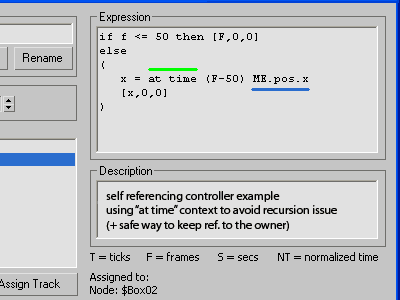
Self Referencing Script Controllers


It's a known problem, I think. The recursion issue appear if we call itself from within Script Controller. The main subject of this thread is how to simplify the "bypass" that usually we made with Custom Attributies. So, I think its s'd be interesting subject for animators and mostly riggers, for scripters maybe too. Usually I suggest workaround that I call "proxy controller", as it's easy for understanding and following, but this time I decide to share and another approach that not so abstract as it looks. It's based on "at time" context which made self-call safety. Well, I'll not going to repeat myself, so just read the forum topic. Cheers!

Friday, September 9, 2011

Ballooning file issue

A time ago I searched for "long time saving issue" and found 2 scripts (removeNoteTrack and removeMixerReftargs) in RangEmotions (RU forum) that solve this problem. And as I remember, I post about this somewhere in my blog. Now I see that this problem has another name - "ballooning file issue" (read notes about by Shane Griffith from Autodesk here) The 2 scripts that Autodesk offer to solve this are identical to previously posted into RangEmotions forum. However is, Denis Trofimov at CGTalk posted optimized version of both scripts and they're very welcome in case we met this problem again.

Thursday, August 11, 2011

Lumberman

I'm a bit busy right now and this is very quick help on user request, but its better than nothing, I hope. It's about to track and delete a wood of thousands overlaped tree proxies, from where come and this funny name Lumberman :) Those script is plain and dirty solution that fill partially this task, but there is some known limitations about proxies, - they have not actual geometry on the scene, and... well, instead of repeat my words, just check the script page for details.

Tuesday, July 19, 2011

Sunday, June 26, 2011

Clear Reactor Collisions Data

Just small macro script (as quick assistance from me to user request at ScriptSpot forum) for debugging scenes, that auto clean embedded Reactor collisions data.

Wednesday, June 15, 2011

Scene file recovery

Two parts tutorial at MaxStation blog on how to recover max scene file that fail to open. The first part cover how to do that by hand and the second part - how to automate the process with MAXScript.

Friday, May 20, 2011

3ds Max 2011 Service Pack 2 available

Service Pack 2 for Autodesk® 3ds Max® 2011 and Autodesk® 3ds Max® Design 2011 available now at Autodesk support page:

Saturday, May 14, 2011

3 scripts by Jonathan de Blok

Jonathan de Blok post 3 scripts at May 13 into ScriptSpot:

Thursday, March 31, 2011

Long time max file save issue

The solution of long time max file save problem, quote RangEmotions (Russian forum):

We faced the problem, - max files in several scenes started to save for a longtime (about 10-15 minutes). We had tested lots of solutions, but nothing hadsolved this problem. The 12kb file was creating and after it ten minutes ofwaiting.


The solution was found: you need to open your file and go to MAXScript / Runscript and run the following scripts by turns.

script_01 + script_02
Looks like this problem appear mostly in 3ds Max 2011, and SP1 and HotFix4 not fixed it. I read also in 3DBG.com (Bulgarian forum), that above solution not help in some cases. The folks at 3DBG report for some Windows registry mess in Max 2011, and the current solution they found at the moment is - to reinstall Max but to new folder location.

Wednesday, December 22, 2010

Select objects with missing UV's

Prior to rendering or exporting to a game engine we need to see which objects will cause problems because of missing UV's. Louis Marcoux offer video tutorial on how to write script for that purpose.

Marcoux script (for explanation watch his tutorial):
clearSelection()
for a in objects do
(
TotalUVNumVerts = 0
for b in 1 to (meshop.getNumMaps a.mesh) do
(
UVFound = try(meshop.getNumMapVerts a.mesh b)
catch(results = 0)
TotalUVNumVerts += UVFound
)
if (TotalUVNumVerts == 0) then selectmore a
)

Recently David Stokes share different approach which I like because it is more simple. He use node.mesh.numtverts test to collect objects with missing UV's.

Stokes script:

unmappedObjs = for obj in geometry where
obj.mesh.numtverts == 0 collect obj

I was afford to add an error check filtering improvements to his solution. So, because we call node.mesh (i.e. using TriMesh) we need to filter and exclude objects like particles, targetObject, ... we can filter the objects using getPolygonCount() function:
select (
for obj in geometry where
(getPolygonCount obj)[2] > 0 collect (
if obj.mesh.numtverts == 0 then obj
else dontCollect
)
)

...or filtered with canConvertTo() function:
select (
for obj in geometry where
canConvertTo obj TriMeshGeometry collect (
if obj.mesh.numtverts == 0 then obj
else dontCollect
)
)

Tuesday, December 7, 2010

Hotfix 4 for 3ds Max (Design) 2011


Hot Fix 4 (Published date: 2010-Dec-03) from Autodesk for Autodesk® 3ds Max® 2011 and Autodesk® 3ds Max® Design 2011 software includes fixes for issues with stability and performance. Specific areas addressed include: FileLink, Graphite Modeling Tools, Bitmap Proxies, Satellite Rendering, Normal Mapping, Quicksilver Hardware Renderer, and User Interface.

Friday, April 30, 2010

Saving out ticks instead of frames?

The problem: Max render float valued frames only when Time Display is set to TICKS, and even that not save them. So, to save sub-frames (by 0.25 step for example) need some cheat. Bobo already suggest something that is not fully clearly to me, for that I test something and it's works. Maybe not the best solution, but it works! :)

Read this forum topic here.

Friday, April 23, 2010

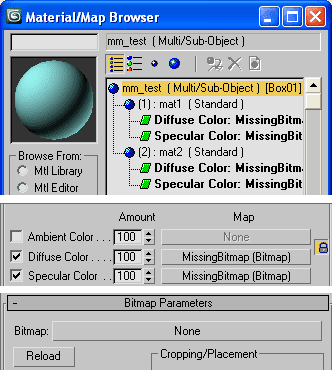
Clean Out Missing Bitmap Textures


Now I see so buried with work this month I have not shared any new script. Yes, I prefer to digress my little free time to my family instead of 3ds Max (or at least this month), but here's something from me though :) The script Clean Out Missing Bitmap Textures is just a quick and dirty way to get rid of missing external files in BitmapTextures. It is useful to disable renderer "Missing External Files" dialog in scenes where the files are irreparable lost (i.e. no chance to relink them). More details you can find in the notes inside the code. Download link is on my MaxScript page. Enjoy!