Pages

Thursday, May 14, 2009

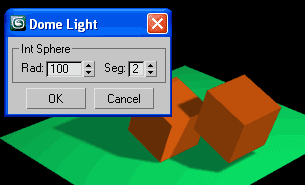
Dome Light for GI


There is a simple script from me.
Create sphere array of lights to simulate GI for fast rendering.

ScriptSpot review
Download [Link 1] [Link 2]

Note:
All lights are instances for easy control and also that means so you can change them at any time from Omni to Spot or Directional, and turn on targets and align them to the point center. If you prefer other type of lights, then create and align it to one of existing lights, and use instance replace. There how, if to say, you align it to DomeLight01, then delete it (DomeLight01) and select your new light, and type in the listener:

instanceReplace $DomeLight* $

Enjoy! :)

Wednesday, May 13, 2009

The ten top tips of texturing


by Jeroen Maton (CGSociety):
"The main goal of this article/tutorial is to give you a few hints and tricks that might help you to make your own textures look better. What you'll read are things other people taught me, or that I had to discover for myself. They are not the only way to handle some of the problems, but over the years I've found that these work best."

Mental Ray Illumination


by Mario Malagrino
(Florence Design Academy)

Download PDF (727 KB)

Mental Ray Caustics


by Mario Malagrino
(Florence Design Academy)

Download PDF (399 KB)

Falling Water


Creating a partical system waterfall in 3DSMAX.
(Mike Heuschele - Kitchen Sink Studios)
Download PDF (699 KB)

Simulating Radiosity


When to fake it in 3DSMAX.
(Sean Looper - Kitchen Sink Studios)
Download PDF (1,091 KB)

Monday, May 11, 2009

Select by color

I did not expect that someone will want script to select by color, then in Max exist "Edit > Select By > Color", but if for some reason you need to do this by script, here's how:

clr = $.wirecolor -- get color from selected
for i in $* where (i.wirecolor == clr) do selectMore i
-- that's all :)

Thursday, May 7, 2009

Ozone 4.0 updated

Updated Ozone 4.0 Open Beta, still Free!
This second Open Beta fixes a number of issues and improves overall stability.
The Ozone 4.0 Open Beta is a free, fully functional version of Ozone 4.0.

Download Ozone 4.0 Open Beta here!

With the Open Beta, you can:

  • Use e-on's atmospheric rendering technologies inside of 3ds Max, Maya, XSI, Cinema 4D or Lightwave
  • Create entirely new atmospheres or load any of the 150+ included presets and modify them to your liking
  • Use any of the 140+ included cloud shapes to customize your cloudscapes
  • Animate the atmosphere, the clouds and the sun
  • Render images with no size limit, and
  • Save and export your work.
Read more information on Ozone 4.0 technologies here!