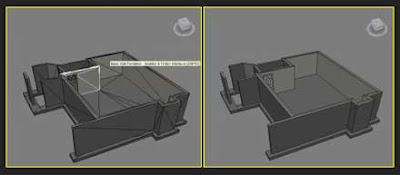
Instantly Auto Edges is a MaxScript that I just I published today. As usual I can share the link to the ScriptSpot post where you can read short description and usage notes, but... I would like to add some tips comments, which could be useful in writing other scripts, so...
First, I looked for a similar script and found 2 old that just loop through selected objects and performs auto edge, shortly - nothing special. Also I found a script by Pierre-Felix Breton. Interesting in the code is excluding instances optimization, which part come from Chris P. Johnson. But honestly, all code snippet looks like Chris job :) However. Well, even in this code, I saw many things that could be improved. As you will see yourself, I used mapped funcions. They are real magic, but the final awesome runtime speed result would be impossible without some tricks. So I wish to focus your attention at them.
First one is about collecting objects edges. Here needed all edges, and Max has easy ways to get faces but not edges. For example there no $MeshObject.NumEdges . Knowing that any face in mesh has 3 edges, Chris use loop from 1 to 3 end expression to collect all edges. This is slow. There is my way (using bitArray and ".numFaces" all is done in 1 command):
Ok, Im add it to my mapped function and even this is enough optimization, i.e. my tests show that the script can operate almost 3 million edges per second ! But why not improve it if possible, right?
So the Second step is as Chris idea but in different method. Knowing that InstanceMgr.GetInstances output an array, it's clear so if the array keep only 1 item then the object has not instances (it's unique). Simple :) And if has more then we need just one of them, so here also not need separate commands. All what we need is to collect the 1st item only. Note: appendIfUnique function is also important! For more see inside the script code.
Well, the fast collecting instances deputy/delegate is not affect directly the final auto edges procedure, but I like it faster :) and as a said - this is a good trick for coding at all.
However, this step is also important because affects drastic scenes with many instances. If you have to say 100 instances - the script will proceed only 1, so it will end 100 times faster. In other words, even large scenes with many instances will end in no time !
My script you can find here.
Ok, that's all :)
First, I looked for a similar script and found 2 old that just loop through selected objects and performs auto edge, shortly - nothing special. Also I found a script by Pierre-Felix Breton. Interesting in the code is excluding instances optimization, which part come from Chris P. Johnson. But honestly, all code snippet looks like Chris job :) However. Well, even in this code, I saw many things that could be improved. As you will see yourself, I used mapped funcions. They are real magic, but the final awesome runtime speed result would be impossible without some tricks. So I wish to focus your attention at them.
First one is about collecting objects edges. Here needed all edges, and Max has easy ways to get faces but not edges. For example there no $MeshObject.NumEdges . Knowing that any face in mesh has 3 edges, Chris use loop from 1 to 3 end expression to collect all edges. This is slow. There is my way (using bitArray and ".numFaces" all is done in 1 command):
edgeList = #{1..(objs.numFaces * 3)}
Ok, Im add it to my mapped function and even this is enough optimization, i.e. my tests show that the script can operate almost 3 million edges per second ! But why not improve it if possible, right?
So the Second step is as Chris idea but in different method. Knowing that InstanceMgr.GetInstances output an array, it's clear so if the array keep only 1 item then the object has not instances (it's unique). Simple :) And if has more then we need just one of them, so here also not need separate commands. All what we need is to collect the 1st item only. Note: appendIfUnique function is also important! For more see inside the script code.
Well, the fast collecting instances deputy/delegate is not affect directly the final auto edges procedure, but I like it faster :) and as a said - this is a good trick for coding at all.
However, this step is also important because affects drastic scenes with many instances. If you have to say 100 instances - the script will proceed only 1, so it will end 100 times faster. In other words, even large scenes with many instances will end in no time !
My script you can find here.
Ok, that's all :)





 Posts
Posts


