Pages

Tuesday, August 24, 2010

Window Cracking with PFlow


A new video tutorial by Joe Gunn that start enticing but finish incomplete.
I learn nothing from Joe this time :/

Friday, August 20, 2010

plugin3D 2.5 is free


Cubicspace announce that their last version 2.5 of plugin3D (alias RTRE - realtime rendering engine) is now free. It's compatible with 32-bit Autodesk 3ds Max 2009, 2010 or 2011.

Tuesday, August 17, 2010

Select object less than X size

This is well discussed tip where MAXScript assistance is necessary, but I see so it still appear as question into the forums. Well, how to select all objects smaller than some certain volume size? Into the MAXScript Reference has a good example function to measure the object volume. The example function in the help return the volume and center of mass, so I was lightly modify it to return only the volume size.
fn CalculateVolume obj = 
(
local Volume= 0.0
local Center= [0.0, 0.0, 0.0]
local theMesh = snapshotasmesh obj
local numFaces = theMesh.numfaces
for i = 1 to numFaces do
(
local Face= getFace theMesh i
local vert2 = getVert theMesh Face.z
local vert1 = getVert theMesh Face.y
local vert0 = getVert theMesh Face.x
local dV = Dot (Cross (vert1 - vert0) (vert2 - vert0)) vert0
Volume+= dV
)
delete theMesh
Volume /= 6
Volume
)
Next, will made another function that to select the objects...
fn selectObjByVolume volLimit = 
(
select (
for obj in geometry where \
CalculateVolume obj <= volLimit collect obj
)
)
... and here is the example usage:
selectObjByVolume 337

Enjoy!

Monday, August 16, 2010

3D Monster


Detailed 3ds Max tutorial for beginners wanting to learn the basics of polygon modeling.

Sunday, August 15, 2010

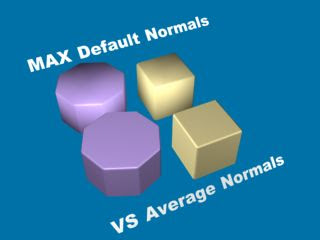
Poly Average Normals


I had not thought of (until now) whether such a script would be interesting for the general public, but after I saw the script of zOffTy, I decided to upload my version too.


The version of zOffTy is nice too. It operate on selected faces. My version use my custom "smart selection" that I found as good time saver, especially for poly objects with many faces. Check both versions (zOffTy Average Normals & my Poly Average Normals) and have fun ;-)

Saturday, August 14, 2010

Parameter Collector


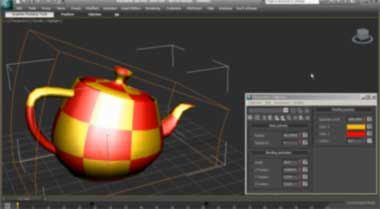
A video tutorial by Alessandro Cangelosi. He show the base usage and benefits of this 3ds Max feature. With Parameter Collector you can create temporal UI with all needed params. That's a good feature for non scripter users. Also it's worth to use the Parameter Collector instead of scripting, because all kind of "tweaker" scripts online which try to "replace" it are not so clear, not so stable and they are too limited.

Friday, August 13, 2010

Creating Grass with Particle Flow


A video tutorial shows 2 manners to create grass with Particle Flow - by filling objects surface or by using particle Birth Painter.

Base tips with getKnotPoint

At the forum topic into Area.Autodesk.com I see a question related to MAXScript function getKnotPoint which return the coordinate of knot in shape. The topic start with a birth script operator but is more closer to the getKnotPoint usage, which is come in use for any operations with shapes via MAXScripts. The birth script operator itself is a modified version of the old (but nice) Bobo's example that position each particle on a vertices of poly or mesh, and the modified version intended to do the same but on knot point of a shape. So, the getKnotPoint required 3 arguments - shape, spline index, knot index. That mean here needed double loop - for each knot in each spline. If the shape has only 1 spline like the Circle for example, then the single loop is enough --
c = Circle()
convertToSplineShape c
theKnots = for k = 1 to 4 collect (getKnotPoint c 1 k)

For a shape with more than 1 spline we need to know the number of the splines, which we get with numSplines function. Before make our double loop, I need to note that NumKnots function has a second argument which is optional, but is important for our case. If we not supply the second argument the NumKnots will return the number of all knots in the shape. But to write compatible with getKnotPoint loop, we need to get knots count per spline! So, lets see this with simple example using Donut (it has 2 splines with 4 knots on each of them):
dn = Donut()
convertToSplineShape dn
theKnots = #()
for Sp = 1 to (numSplines dn) do
for k = 1 to (NumKnots dn Sp) do
append theKnots (getKnotPoint dn Sp k)

And just for reference - here is how the mentioned birth operator w'd like:
on ChannelsUsed pCont do
(
pCont.useposition = true
pCont.useTime = true
)

on Init pCont do
(
global pflowguide = $guide
)

on Proceed pCont do
(
if pflowguide != undefined do
(
t = pCont.getTimeStart() as float
theKnots = #()

if t <= 0 do
(
for Sp = 1 to (numSplines pflowguide) do
for k = 1 to (NumKnots pflowguide Sp) do
append theKnots (getKnotPoint pflowguide Sp k)
for i = 1 to theKnots.count do
(
pCont.AddParticle()
pCont.particleIndex = pCont.NumParticles()
pCont.particleposition = theKnots[i]
)
)
)
)

Note that the script is written for an existing shape named "guide", that mean if you wish to use this script then (A) you need to rename your shape to "guide" or (B) you need to edit this line in the script:

global pflowguide = $guide


That's all. Cheers!