With this quick and short voxel animation greetings
I wish you happy and fun new year!
The script I wrote by the way to build and animate this voxels
I'll publish very soon (maybe tomorrow).
Cheers!
Friday, December 31, 2010

Tuesday, December 28, 2010
FBX batch exporter
The question (read here) is (quote): I need a script that will batch export a selection of objects in a scene as .FBX files named the same as they are in max and into the same folder as the max file.
...and here is my quick reply:
Cheers
...and here is my quick reply:
...hope its useful. If you need to specifying FBX export settings, look into the MAXScript Reference for "FBX Export Dialog Access" topic.if maxFilePath != "" and selection.count > 0 do
(
savePath = maxFilePath
selObjs = getCurrentSelection()
clearSelection()
for obj in selObjs do
(
select obj
FName = savePath + obj.name + ".fbx"
exportFile FName #noPrompt selectedOnly:true
)
)
Cheers
Thursday, December 23, 2010
Merry holidays!

A lot of job come to my head for the Christmas holidays,
but I hope you celebrate twice as much in my stead :D
Merry Max'ing!
but I hope you celebrate twice as much in my stead :D
Merry Max'ing!

Wednesday, December 22, 2010

Select objects with missing UV's
Prior to rendering or exporting to a game engine we need to see which objects will cause problems because of missing UV's. Louis Marcoux offer video tutorial on how to write script for that purpose.
Marcoux script (for explanation watch his tutorial):
Recently David Stokes share different approach which I like because it is more simple. He use node.mesh.numtverts test to collect objects with missing UV's.
Stokes script:
I was afford to add an error check filtering improvements to his solution. So, because we call node.mesh (i.e. using TriMesh) we need to filter and exclude objects like particles, targetObject, ... we can filter the objects using getPolygonCount() function:
...or filtered with canConvertTo() function:
Marcoux script (for explanation watch his tutorial):
clearSelection()
for a in objects do
(
  TotalUVNumVerts = 0
  for b in 1 to (meshop.getNumMaps a.mesh) do
  (
    UVFound  = try(meshop.getNumMapVerts a.mesh b)
    catch(results = 0)
    TotalUVNumVerts += UVFound
  )
  if (TotalUVNumVerts == 0) then selectmore a
)
Recently David Stokes share different approach which I like because it is more simple. He use node.mesh.numtverts test to collect objects with missing UV's.
Stokes script:
unmappedObjs = for obj in geometry where
  obj.mesh.numtverts == 0 collect obj
I was afford to add an error check filtering improvements to his solution. So, because we call node.mesh (i.e. using TriMesh) we need to filter and exclude objects like particles, targetObject, ... we can filter the objects using getPolygonCount() function:
select (
  for obj in geometry where
    (getPolygonCount obj)[2] > 0 collect (
      if obj.mesh.numtverts == 0 then obj
        else dontCollect
    )
)
...or filtered with canConvertTo() function:
select (
  for obj in geometry where
    canConvertTo obj TriMeshGeometry collect (
      if obj.mesh.numtverts == 0 then obj
        else dontCollect
    )
)Bake-A-pi - Pie Charts Maker
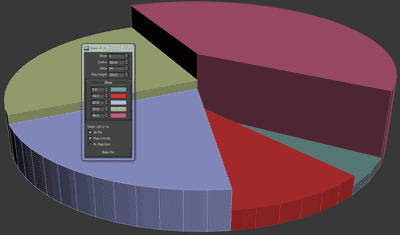
A new max script by Raphael "Insanto" Steves.
"Heres a tool to make your 3D PieCharts for you."
More at ScriptSpot.
"Heres a tool to make your 3D PieCharts for you."
More at ScriptSpot.
Tuesday, December 21, 2010
Max Underground

Well, my blog is made for 3ds Max users and lovers so hardly ever this is a real news for them. MaxUnderground.com is the most popular site for fresh Max news of the day, but if by chance you miss it then it's time to visit and add bookmark it.
Subscribe to:
Posts (Atom)

 Posts
Posts


